




Originally published 15 January 2025. Republished and updated 5 November 2026.
Before you print packaging or pay a filing fee, a trademark public search in India tells you whether the Trade Marks Registry’s records already hold your name or something close to it. In November 2026 the Registry offers two free tools, a classic public search and an AI/ML search, and both now ask you to sign in.
This guide covers the Indian register kept by the Trade Marks Registry under the Trade Marks Act, 1999; foreign registers need separate searches. The classic search, often called a TM public search, runs one class at a time, because the Registry sorts goods and services into 45 numbered classes; the AI/ML search covers all classes in one pass. The portal screens shown here were checked on 4 November 2026, and the portal can change, so treat them as a guide rather than a fixed description.
Quick answer: Sign in to the Registry’s public search with a one-time password. Run a wordmark search and a phonetic (sound-alike) search for your name in every class you will file in and in closely related classes; for a logo, add a Vienna code search and the AI/ML image search. Read each result for its status, dates, class and goods, not just the name. The search is free, but a clean result is a starting point, not clearance.
What a trademark public search in India shows, and what it cannot
A public search shows the Registry’s records of applications and registrations: the mark, its owner, class, filing date, claimed date of first use, validity date, status and the goods or services covered. It cannot show names used without registration or copyright in a similar logo, and it cannot tell you how the Registrar will weigh two similar marks.
The reason to search before filing is that the Registry will search anyway. When it examines an application, the Rules require a search of earlier marks, registered or applied for, to find any identical or deceptively similar mark (one close enough to confuse buyers) for the same or similar goods or services. A public search lets you see roughly what the examiner will see, before you have paid the filing fee and before the brand is on packaging.
The gaps are earlier rights that are not on the register. A business that used a similar name before you, without registering it, does not appear in the results. It can still oppose your application, meaning formally object once the application is published, if passing-off law (the claim that a newcomer is trading on its name) would let it stop your use, and it can sue you for passing off whether or not you register. Someone who owns the copyright in similar artwork can likewise object to a logo, which is why a register search is the first step of clearance rather than the whole of it.
The Registry’s two search tools in 2026
IP India’s Search Existing Trademarks page lists both tools. On the portals, the classic Trademark Search needs a one-time password to sign in and a captcha for every search, and covers one class at a time; the Trademark Search (AI/ML, for artificial intelligence and machine learning) needs an account, searches all classes at once and accepts a logo image.
| Feature | Classic public search | AI/ML trademark search |
| Sign-in | One-time password to email or mobile, after an arithmetic captcha | An account; sign-up link on the login page |
| Captcha on each search | Yes | Not seen on a text search |
| Search types | Wordmark, Vienna Code, Phonetic | Text, Phonetic, Image upload |
| Classes per search | One, chosen from 1 to 45 | All, then filtered by class and status |
| Word match options | Start With, Contains, Match With | Contains, Match With, Start With |
| Output | Results table; report or Excel export | Cards or list; downloadable report |
The Search Existing Trademarks page links to both. The AI/ML search carries its own on-screen disclaimer: its results depend on what you enter, and the decision on an application is made at examination under the Act and Rules.
In practice the two do different jobs. The AI/ML search is a first sweep across every class in one pass, and of the two it is the one that takes a logo upload. The classic search is the methodical, class-by-class check that produces a dated report. Its Help link still opens the Registry’s earlier user guide, whose screens predate the sign-in and the captcha and describe options the current form lacks, such as a goods-description search, so older screenshots you find online may not match.
How to run the classic public search, step by step
Sign in, choose the search type, enter the word with a match option, pick one class, answer the captcha and search. Then read the results table and save a dated record of what you found, whether or not anything close came up, so you can show later what you checked.
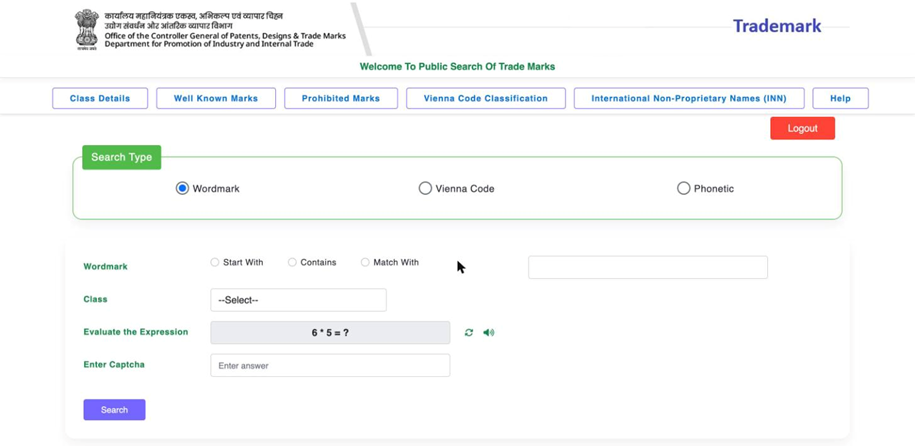
- Open the Registry’s public search, enter an email address or mobile number, answer the arithmetic captcha and enter the one-time password you receive.
- Choose Wordmark (spelling), Phonetic (sound-alike) or Vienna Code (logo elements) as the search type.
- For a wordmark, type the word and choose Start With (marks that begin with your word), Contains (your word anywhere in the mark) or Match With. Use more than one, together with spelling variants, the dominant part of the name and any transliterations.
- Pick the class from the dropdown. It takes one class at a time, so repeat the search for each class you will file in and for closely related classes. The trademark class search tool helps identify them.
- Answer the captcha and click Search. A new captcha is asked for every search.
- Read the results table, which shows each record’s application number, class, application date, mark, proprietor, claimed date of use, validity date, status, image and goods or services. You can show up to 1,000 records a page and filter within them.
- Tick the records you want and use Report. The computer-generated search report is headed with your search word, class and date, and gives each ticked record’s proprietor and address, Journal number and date, status and goods, and can be printed or exported to Excel.
- Keep a full record: the search word, search type, match option, class and date, and the full result list (Export to Excel ALL). Keep reports for the records that matter and a note of why you set borderline ones aside. If the search returns no records, save a dated screenshot showing the query and the result; a report built from ticked rows is only a selection of the results.
Searching a logo
Vienna codes are the international codes for the picture elements in a logo, such as a sun or a star. The portal’s menu carries a Vienna Code Classification link, and the guide to Vienna codes in trademark search explains how to find the right codes. Each classic Vienna Code search has a single code box and one class, so repeat it for each class you need, and for each code if the box will not take more than one. Search the words in the logo as a wordmark as well.
Running the AI/ML search
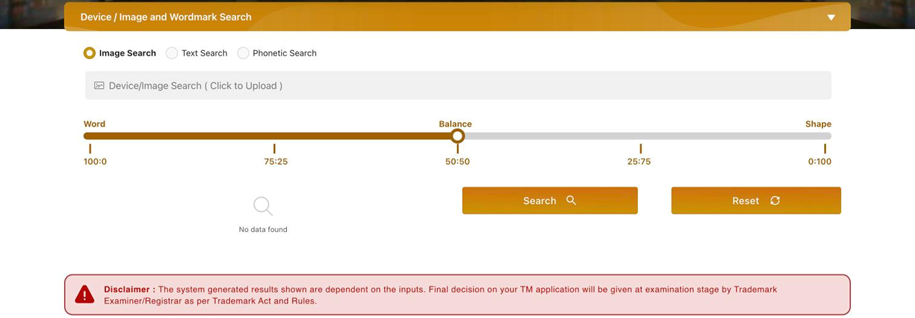
Open Trademark Search (AI/ML) from IP India’s Search Existing Trademarks page, or from the AI based Trademark Search link on the classic sign-in page, and sign in or use Sign Up to create an account. Choose Text, Phonetic or Image Search; for a logo, upload the image and set the slider between Word and Shape. Search, then narrow the results with the Class and Status filters, switch between card and list views, and use Download Report to keep a copy.
Why one search type is not enough: a worked example
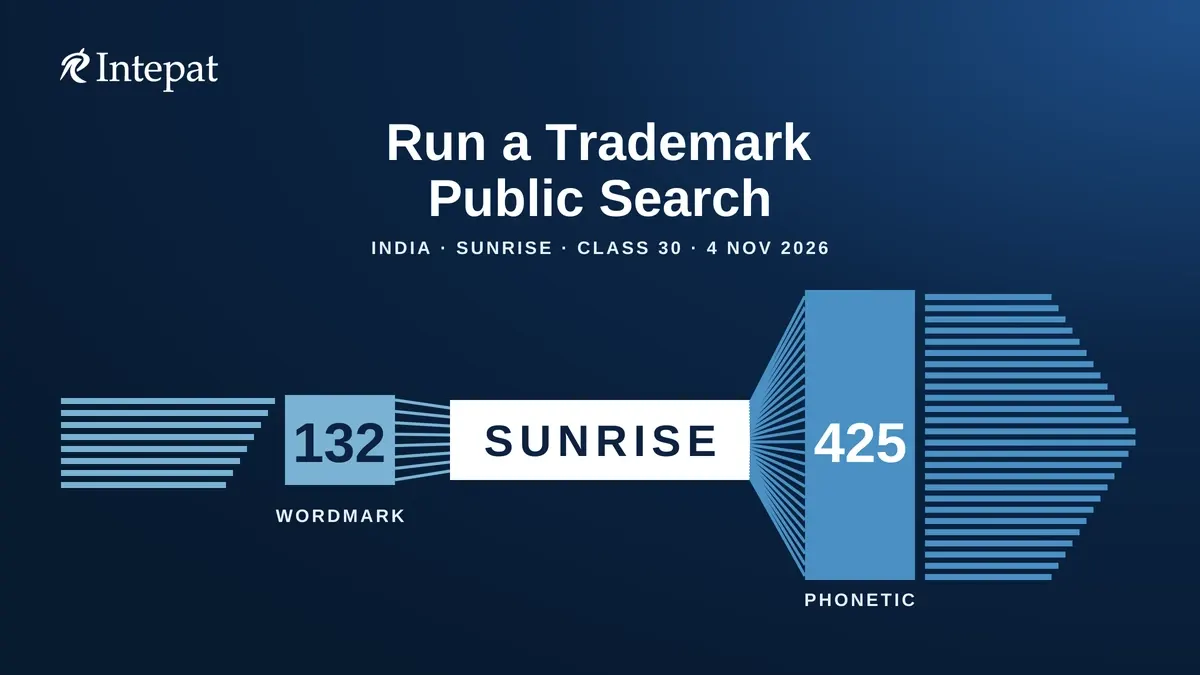
One search type is not enough because a wordmark search matches spellings and a phonetic search matches sounds, and confusion can arise from either. In our test on 4 November 2026, the same word in the same class returned 132 records as a Start With wordmark search and 425 as a phonetic search.
We searched SUNRISE in Class 30, the class for goods such as tea, coffee and spices. The Start With wordmark search returned records including SUN RISE and SUN-RISE, so it caught spacing and hyphen variants. The phonetic search of the same word in the same class returned, among others, SUNRICH, SONRISE, SYMRISE, SUNRAYS and SUNRIGHT. Our Start With search for SUNRISE returned none of them, as none begins with that word even ignoring spaces.
The phonetic run also returned remote marks, such as SHAMROCK, so its list has to be read by hand, not trusted as a ranking of risk. The decision rule that follows: run both a wordmark and a phonetic search in every class you need, and for a logo add a Vienna code search and an image search.
Reading a result without being misled
Read four things in every relevant record: the status, the dates, the goods or services, and the class shown. Each can mislead on its own, and two of the traps come from how the records are displayed rather than from the law.
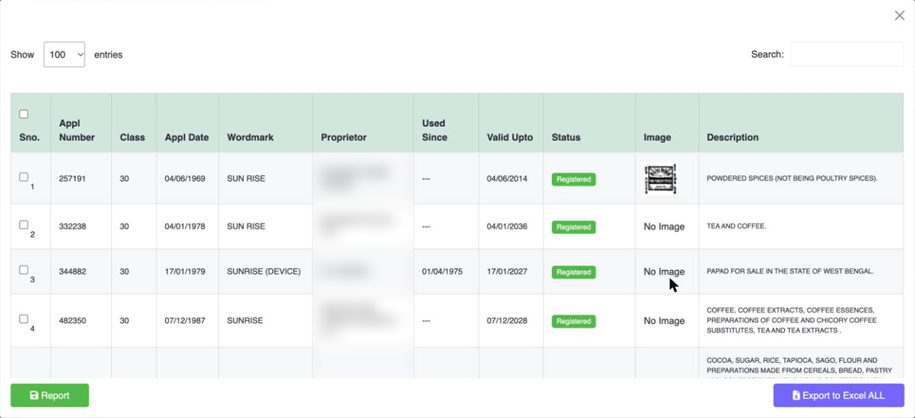
Status and validity date can disagree. In our test several records showed “Registered” next to a validity date years in the past. Check the application number on the Registry’s Track Application Status page before deciding whether the mark is alive; the guide to trademark status in India explains the common labels.
A lapsed or removed mark is not necessarily gone. Its owner can still renew with a surcharge within six months after the last registration expired and, if the mark was removed for non-payment of the renewal fee, can apply between six months and one year after that expiry to have it restored, which the Registrar may do, with or without conditions, if satisfied that it is just. A mark removed for not being renewed still counts against a new application for one year after its removal, unless the Registrar (or the High Court) is satisfied that it was not genuinely used in trade in the two years before removal, or that the removed mark’s past use is unlikely to cause deception or confusion with the new mark.
An application with an earlier filing or priority date than yours counts as an earlier mark, so a record marked Objected or Opposed is not a green light. That includes an Indian application claiming priority from a filing in a convention country made up to six months before, and international registrations designating India.
“Used Since” shows the date of use the applicant claimed in its application; read it as a claim, not a confirmed fact. A multi-class application appears with its class shown as “99 & Multi Class” (99 is a portal label, not one of the 45 classes) even inside a single-class search, so read its goods description or check its status page for the classes it covers. Finally, compare the goods or services each mark covers and how likely confusion is, rather than relying on the class number: different class numbers do not prove the goods or services are unrelated. An identical or similar name for the same or similar goods or services is where the risk lies, and a well-known mark, passing off and copyright are separate risks again. The guide to the grounds on which a mark is refused explains how the Registrar weighs these factors.
Well-known, prohibited and medicine names
After sign-in, the classic portal’s menu also links to three separate pages: Well Known Marks, Prohibited Marks and International Non-Proprietary Names (INNs, the generic names of pharmaceutical substances). Check each, and any other restriction on protected names and emblems, before you settle on a name; these pages are starting points, not exhaustive clearance.
The owner of a mark well known in India can oppose an identical or similar mark even for unrelated goods, if its use without due cause would take unfair advantage of, or harm, that mark’s distinctive character or repute. The portal’s list is a starting point: a mark can be treated as well known without being on it, and without being registered or used in India.
A word declared by the World Health Organisation as an INN and notified by the Registrar, or one deceptively similar to it, cannot be registered at all; nor can the commonly used and accepted name of a single chemical element or single chemical compound (not a mixture) for a chemical substance or preparation. A registration that slips through is open to removal from the register, which matters to any pharmaceutical brand.
What to do with what you found
If the register searches show no material conflict, check whether the mark is distinctive, whether any prohibition applies and whether anyone holds earlier unregistered rights before you decide to file. A public search is an initial screen. Where a close mark appears, or the brand will carry real investment, get a clearance opinion before you commit to the name.
- No material conflict found: complete the wider clearance review, run the register searches again just before filing, and keep dated records of the searches and your assessment.
- A close mark, registered or pending, for the same or similar goods or services: assess it before spending on branding. Possible responses include changing the mark, narrowing the goods or services where that genuinely removes the conflict, or relying on earlier use, the other owner’s consent or honest concurrent use. Earlier use protects you against a registered mark where you, or a business you took the name over from, have used it continuously for those goods or services from before the other owner’s first use or its registration, whichever came first; later use may still support honest concurrent use. None of these routes guarantees registration or clearance for use.
- A close mark advertised or re-advertised in the Trade Marks Journal less than four months ago: anyone can still oppose it. The search report gives each mark’s Journal number and date, but check the Journal entry itself before relying on a deadline.
- Close marks only for unrelated goods, or only abandoned or removed records: this is a judgment call, and it is where a clearance search strategy and a written opinion earn their cost.
The government fees around a search, for comparison (verified as of November 2026):
| Government fee | Online | On paper |
| Application, per class and mark: individual, startup or small enterprise | Rs 4,500 | Rs 5,000 |
| Application, per class and mark: other applicants | Rs 9,000 | Rs 10,000 |
| Preliminary advice on distinctiveness (Form TM-M) | Rs 1,800 | Rs 2,000 |
| Search certificate for an artwork (Form TM-C) | Rs 9,000 | Rs 10,000 |
| Expedited search certificate (Form TM-C) | Rs 30,000 | Not allowed |
The startup and small enterprise rate needs supporting proof with the application.
If you plan to apply, you can also ask the Registrar for preliminary advice on whether the mark appears, at first sight, to be distinctive (able to identify your business rather than describe the product). The request is made on Form TM-M for goods or services taken from the Registrar’s published index, with one representation of the mark and the fee, and the Registrar may give the advice but is not bound to. It answers only that question, not whether the mark can be registered or whether someone else owns a similar one, so it complements a search. If the advice is favourable, you apply within three months, and the Registrar later objects that the mark is not distinctive, you can give written notice of withdrawal within one month of receiving that examination report and have the filing fee repaid.
Form TM-C is a different thing, although the Rules call it a request for search. It asks the Registrar to certify, for a copyright application in an artwork such as a logo, that no identical or deceptively similar trademark has been registered or applied for by someone else; the certificate ordinarily issues within 30 working days, or 7 if expedited. It is not a name availability search, and the free public search remains the tool for that.
For a fuller guide to search types and risk grading, see our guide to trademark search in India, and for the steps after a clean search, the trademark registration process. Intepat IP’s trademark team runs searches across registers, common-law use and digital channels and gives a risk-graded written opinion as part of our trademark search and clearance service.
Related reading: WIPO Madrid Trademark Search
Frequently asked questions
No. The Act and the Rules do not make a search a condition of filing. The Registry searches earlier marks itself at examination, so skipping your own search risks finding a conflict only after you have paid the fee and put the name on products: at examination, at opposition, or when an earlier owner acts against your use.
We were not asked to pay at any point when we signed in and searched both tools on 4 November 2026, using an existing account on the AI/ML search. Both now need you to sign in: the classic search by one-time password, with a captcha before every search, and the AI/ML search by account and password.
No. A search checks only the Registry’s records. Examination also asks whether the mark is distinctive and not merely descriptive, and a business that was already using a similar unregistered name can still oppose. A clean result lowers the risk of a conflict objection; it does not remove the other grounds of refusal.
Repeat it just before you file, and again if the launch or filing slips by weeks. Any application with an earlier filing or priority date counts as an earlier mark, so a name that was clear last month can have a conflict today, and a filing claiming foreign priority can surface after you file. Keep each dated record.
Use both. The AI/ML search covers every class in one pass, takes a logo upload and did not ask for a captcha on a text search. The classic search gives the class-by-class wordmark, phonetic and Vienna code checks and a dated report. Neither tool decides whether your application will be accepted.
No. Neither search form we checked on 4 November 2026 has a goods or services search box. Use a classification tool to find the classes for your goods, then search your name or logo in those classes and read the goods column of each result to see what the earlier mark covers.
Run a Vienna code search on the classic portal for each picture element, in each class you need, and search the words in the logo as a wordmark. Then upload the logo to the AI/ML image search and set the Word to Shape slider; the results can then be filtered by class. Read every result list by hand.
This article explains the law on searching for earlier trademarks in India as at November 2026 and is for general information only. It is not legal advice. Government fees, forms, and procedures change; confirm current figures with the Trade Marks Registry before you file. For advice on your specific mark, consult a trademark attorney.